
Riff-Video Chat & Make Friends
Ethan CarterEntertainment
4.6151.00 Reviews
- Version
- 1.1.1
- Installs
- 10.00M
- Age Rating
- Mature 17+
Screenshots

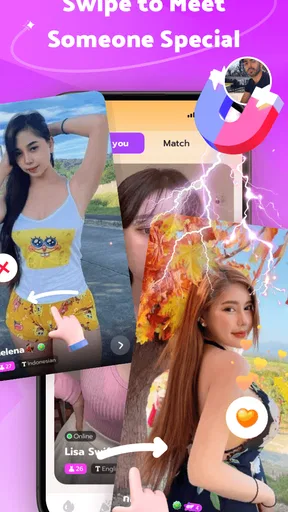


Our Review of Riff-Video Chat & Make Friends
 Analysis by Appyee
I spent time with Riff-Video Chat & Make Friends as an entertainment app built around live, interactive video socializing. Its appeal is easy to understand: instead of scrolling through finished clips or sending messages that may sit unanswered, you take part in a more immediate visual conversation. That immediacy can make a quiet evening feel more social, but it also means the quality of your experience depends heavily on the connection around you, the people you meet, and how comfortable you are being visible on camera.
Riff is free to install, developed by Ethan Carter, and aimed at mature users aged 17 and over. It has reached more than ten million installs and holds a 4.6 average from roughly one hundred five thousand ratings, which suggests that the basic idea has found a sizable audience. I would not treat those figures as a guarantee that every session will be enjoyable, though. A live social app is less predictable than a conventional entertainment app because the content is shaped by real people in real time.
How Riff feels when the connection is doing the work
The strongest moments came when the network stayed steady and the conversation moved naturally. Live video has a different rhythm from ordinary social feeds: there is less time to edit your reaction, and small gestures or pauses become part of the exchange. That can feel more personal than text chat, especially when you are trying to meet people beyond your usual circle.
At the same time, a live conversation exposes every weakness in the connection. A short delay can make two people talk over one another. A frozen image can turn a friendly introduction into an awkward silence. When the video catches up all at once, the conversation may already have moved on. These are not minor cosmetic problems; they change how people interpret one another.
My practical advice is to judge a session by the quality of the interaction rather than by how many conversations you can start. Rushing from one contact to another may create activity, but it does not necessarily create a useful social experience. I found Riff more rewarding when I treated each connection as a short conversation that deserved attention, rather than as a feed to consume quickly.
That approach also helps with the app’s mature audience. A live video environment calls for more awareness than a passive entertainment service. You should decide in advance what you are comfortable showing, saying, and sharing. I would avoid revealing identifying details during an early conversation, and I would leave immediately if someone makes you uncomfortable. The convenience of live contact should never outweigh your personal boundaries.
Why a stable network matters more here than in ordinary social apps
With a typical video feed, a brief network slowdown may simply cause a clip to load a little later. Riff has less room for that kind of recovery because the other person is waiting in the same moment. A connection that feels perfectly adequate for reading posts or sending messages may still produce a frustrating video exchange.
This makes location part of the experience. A quiet room with a dependable connection is a better setting than a crowded place where your phone is constantly switching between network conditions. If you are planning a longer conversation, I would also keep the device in a position that does not force you to hold it awkwardly. Small physical distractions become surprisingly noticeable when the interaction is live.
There is a useful trade-off here. Riff can feel more spontaneous than carefully edited social content, but spontaneity means you cannot control every part of the experience. You may meet someone engaging, or you may spend time waiting through a poor connection and an uninteresting exchange. That unpredictability is part of the app’s character, not something I would expect it to eliminate.
Using it in ordinary mobile situations
Riff makes the most sense when you have a little time and enough privacy to participate properly. I can imagine using it after work, when I want a social break but do not want to commit to a long call with someone I already know. It also suits a user who enjoys meeting unfamiliar people and is comfortable deciding quickly whether a conversation feels worthwhile.
It is less suitable for every spare minute. If you are walking through a busy area, waiting in a noisy line, or sharing a room with other people, the live format may be more trouble than entertainment. You have to pay attention to your surroundings, your camera framing, and the person on the other side. That is a very different demand from opening a short clip while waiting for an appointment.
One realistic scenario is a user settling in at home with half an hour available. They open Riff expecting a casual social experience, find a conversation that is pleasant but slightly delayed, and decide to move closer to a stronger connection before continuing. That simple adjustment can make the difference between constantly repeating yourself and having a relaxed exchange. I would regard this as a mobile habit worth developing: if the conversation matters, improve the setting instead of blaming the other person too quickly.
Another useful habit is to keep your first interaction deliberately simple. A short greeting and a neutral topic let you test whether the video and audio feel natural before you invest more time. If the connection is unstable, you learn that early. If the person is not a good fit, you can move on without having shared too much. This is a more sensible workflow than treating every new contact as a commitment.
Because Riff is an entertainment app, I would not use it as a replacement for dependable communication. If you need to discuss something important, coordinate plans, or maintain a serious conversation, ordinary messaging or a familiar calling service is usually the safer choice. Riff is better understood as a spontaneous social space, not as a tool for guaranteed contact.
What to expect from the mobile experience
The app supports a style of interaction that naturally favors a phone held close at hand. That is convenient, but it can also make the experience physically demanding. A long session may leave you concentrating on the screen instead of the conversation, especially if you are trying to keep the camera pointed in a particular direction.
I recommend choosing a comfortable position before starting rather than adjusting the phone repeatedly during a conversation. This is not merely about appearance. A stable setup makes it easier to listen, respond, and notice when the connection is beginning to struggle. It also reduces the temptation to multitask, which can make a live exchange feel dismissive to the other person.
The mature age rating is another reason to use judgment about where and when you open it. I would not hand the phone to a younger user or assume that a shared family setting is appropriate. A live social environment requires the account holder to take responsibility for the conversations they enter and the material they may encounter.
When a session fails and how I recover
Failure in a live video app is rarely dramatic. More often, it appears as a delay, a stalled image, a conversation that becomes hard to follow, or a sudden loss of momentum. The important thing is not to keep forcing a bad session. If the interaction is repeatedly breaking up, I would end it politely, check the connection, and try again later or from a better location.
That recovery process is one of the less obvious skills Riff asks from its users. In a normal feed, you can blame a bad loading moment on the app and continue scrolling. In live socializing, you need to separate three possibilities: the network may be struggling, the other person may be disengaged, or the conversation may simply not be a match. Treating every problem as a technical fault can waste time.
I also found it useful to avoid making a poor connection feel personal. A delayed answer does not automatically mean the other person is ignoring you. Before reacting, give the exchange a moment and see whether the pattern continues. If the problem affects every response, ending the interaction is reasonable. This small pause helps prevent unnecessary conflict caused by technology rather than intent.
For users who are sensitive to awkward moments, this is where Riff may feel less comfortable than asynchronous social apps. You cannot always compose the perfect reply, and you may encounter people who leave without explanation. That is normal for a live meeting format, but it can still feel discouraging if you prefer predictable, carefully paced communication.
My recovery routine would be straightforward: stop moving around, place the phone somewhere stable, return to a stronger connection if possible, and restart with a brief conversation rather than immediately attempting a long one. If the same problem continues, I would switch to another form of entertainment instead of repeatedly refreshing the experience. The app is meant to add social energy, not turn a relaxing evening into troubleshooting.
Privacy and personal boundaries during recovery
A failed conversation is also a good moment to review what you have already shared. If a session ends abruptly, do not assume the next person has the same context or intentions. Keep introductions general until trust develops, and remember that live video can reveal more than you planned through the background, nearby voices, or objects visible behind you.
I would prepare a neutral space before using Riff regularly. A plain background is not required, but it reduces accidental disclosure and keeps attention on the conversation. I would also avoid showing documents, screens, addresses, or anything that identifies where I am. These precautions are especially important because the app’s core value comes from meeting people you may not know.
There is a difference between being open and being careless. Riff rewards enough openness to make conversation feel genuine, but it does not require you to reveal private information. That balance is one of the main factors separating a pleasant session from an uncomfortable one.
Making Riff less demanding on your data and attention
Live video naturally consumes more network capacity than text messages or ordinary browsing. I would therefore avoid opening a long session while relying on a limited mobile plan unless I already knew how much usage I could comfortably afford. The app is free to download, but free access does not mean that network use has no cost, particularly when mobile data is involved.
There are also optional purchases ranging from forty-nine cents to one hundred ninety-nine dollars and ninety-nine cents per item. That is a very wide range, so I would approach the purchase system carefully. Before spending, decide what you actually want from the app and whether the social experience is already worthwhile without adding paid items. A low entry price can make experimentation feel harmless, while larger optional purchases deserve much more deliberate consideration.
My preferred approach would be to use Riff when I have a reliable connection, keep sessions intentional, and avoid leaving live video running while doing something else. This saves data and improves the quality of the interaction at the same time. Background multitasking is particularly wasteful here because you may be consuming network resources without giving the conversation your full attention.
Another practical tip is to treat the app as a focused activity rather than an always-open social channel. Decide what you want from the session: a few new conversations, a short break, or a chance to practice being more socially spontaneous. Having a purpose makes it easier to stop when the experience becomes repetitive or when the connection is no longer good enough.
Battery and attention matter as well. A live camera session asks more from a phone than reading text, and a user who is already tired may not enjoy the pressure of responding in real time. If you want low-effort entertainment, a conventional video service or a music app may be a better match. Riff is most valuable when you want participation, not just distraction.
How Riff compares with familiar alternatives
Compared with messaging apps, Riff offers more immediacy but less control. Messages let you answer when ready, reread what was said, and decide how much of yourself to reveal. Riff gives you a stronger sense of presence, yet it also exposes pauses, connection problems, and mismatched energy immediately.
Compared with ordinary video-calling tools, its attraction is the possibility of meeting new people rather than arranging a call with an existing contact. That makes it more spontaneous, but also less predictable. If your priority is dependable communication with friends or family, I would choose a conventional calling service. If your priority is discovering new social interactions and accepting some uncertainty, Riff has a clearer reason to exist.
Compared with passive entertainment feeds, the app asks more from you. You are not simply receiving a stream of content selected for quick consumption; you are contributing to the experience through your presence and responses. That can feel refreshing when you are tired of scrolling, but it will not suit someone who wants complete control over what appears on screen.
The best alternative depends on the kind of social energy you want. Choose messaging for patience and privacy, established calling tools for reliability, and passive video for effortless viewing. Choose Riff when the appeal is the live meeting itself and you are willing to manage the network, boundaries, and unpredictability that come with it.
Who should try it and who should skip it
I would recommend Riff to adults who enjoy spontaneous video interaction, do not mind making quick judgments about conversations, and have enough privacy to use a camera comfortably. It is especially interesting for someone who feels that ordinary feeds have become repetitive and wants entertainment that involves a real exchange rather than endless scrolling.
I would skip it if you dislike being seen, need every interaction to be carefully moderated by your own choices, or become frustrated when a conversation ends suddenly. It is also not my first recommendation for younger users, people looking for formal communication, or anyone with a very limited mobile data allowance who cannot easily use a dependable connection.
The app runs on Android devices using version 5.0 or later, and the current version is 1.1.1. That makes it accessible to a broad range of compatible phones, although compatibility alone does not guarantee a smooth live-video experience on every device. The quality of the network and the comfort of the phone in your hand still shape the session more than the installation process does.
Riff is also not a substitute for building trust slowly. A live introduction can feel personal very quickly, but that feeling should not be confused with knowing someone well. I would keep the first exchanges light, avoid moving too quickly into private details, and leave whenever the interaction crosses a boundary. The app works best when spontaneity is paired with common sense.
My connectivity verdict
After using it, I see Riff as a focused entertainment option for people who want live social contact rather than another polished stream of content. Its biggest strength is the sense of immediacy: when the connection is stable and the conversation clicks, the experience feels more active and human than browsing a conventional feed.
Its biggest weakness is inseparable from that strength. Network delays, awkward pauses, sudden departures, and uneven conversations are part of the format. You need to bring patience, a sensible mobile setup, and clear personal limits. Users who expect every session to be smooth will probably prefer a more controlled alternative.
The free entry point makes it easy to explore, while the mature rating and optional purchases mean I would use it thoughtfully rather than casually handing it to anyone or spending without a plan. My recommendation is simple: try it when you have privacy, a dependable connection, and genuine interest in talking with unfamiliar people. Riff is at its best when connectivity supports a real conversation, not when it is used as background noise.
For me, that makes it worth trying but not universally essential. It fills a specific space between messaging, video calling, and passive entertainment. If that space matches what you are looking for, Riff can turn a spare half hour into something unexpectedly social. If you mainly want reliability, quiet browsing, or complete control, another category of app will serve you better.
Verdict
Strengths of Riff-Video Chat & Make Friends
- Quick video matching makes meeting new people feel spontaneous.
- Interest-based discovery helps users find more compatible conversations.
- Simple interface is easy to navigate for first-time users.
- Live interactions can feel more personal than text-only social apps.
- Useful option for practicing languages with people worldwide.
Limitations of Riff-Video Chat & Make Friends
- Random video chats may expose users to inappropriate or uncomfortable behavior.
- The quality of conversations depends heavily on who is online.
- Some features or interactions may require in-app purchases.
- A stable internet connection is essential for smooth video calls.
- Privacy-conscious users may dislike sharing video with strangers.
Similar Picks in This Category
View All
Google Play Games
Google LLC3.9

Netflix
Netflix, Inc.4.8

YouTube Kids
Google LLC4.2

Disney+
Disney4.4

Prime Video
Amazon Mobile LLC4.7

Steam
Valve Corporation3.2
Frequently Asked Questions
What is Riff – Video Chat & Make Friends?
Riff is a social video-chat app designed for meeting new people, starting conversations, and making friends through short videos and live interaction. After creating a profile, users can discover other members, watch shared content, and connect based on interests or mutual engagement. The experience is centered on casual communication rather than traditional text-only social networking.
Is Riff – Video Chat & Make Friends free to download and use?
Riff can generally be downloaded without an upfront charge, but some features may depend on optional in-app purchases, subscriptions, or virtual items. The exact pricing and available functions can change according to the platform, region, and current app version. Before confirming a purchase, review the payment screen carefully and check whether any subscription renews automatically.
Do I need to create an account to use Riff?
An account is normally required to access the main social and video-chat features. Registration may involve an email address, phone number, or an existing login provider, along with basic profile information. Users should choose a strong password, avoid sharing private details publicly, and review the app’s privacy settings before interacting with people they do not know.
Is Riff safe for meeting and chatting with strangers?
Riff includes the usual risks associated with meeting unknown people online, so users should remain cautious even when profiles appear friendly or genuine. Avoid sharing your home address, financial information, passwords, or private images. Use blocking and reporting tools when available, and end conversations that become uncomfortable, suspicious, or inappropriate. Younger users should follow applicable age requirements and use parental guidance.
What should I check before downloading Riff on Android or iPhone?
Before downloading Riff, check that your Android or iOS device meets the app’s current operating-system requirements and has enough storage for video content. A stable internet connection is important because video chats can consume significant mobile data. Also review the developer information, permissions, privacy policy, age rating, user reviews, and subscription terms to make sure the app suits your expectations.
